Managed software support is one of the most misunderstood terms in IT procurement, and that misunderstanding costs organisations money. Many IT managers assume it simply means having someone to call when something breaks. It does not. What is managed software support, precisely? It is a proactive, contractual model where a specialist provider takes ongoing responsibility for the health, security, and performance of your software systems, well before anything fails. This article clarifies the definition, distinguishes it from other support models, and gives you the practical framework to evaluate and choose the right approach for your organisation.
Table of Contents
- Key takeaways
- What is managed software support, defined
- How managed support differs from other support types
- Operational efficiency and risk reduction
- How to choose software support for your organisation
- Managed software support in practice
- My honest take on managed software support
- How Pixeldev approaches managed software support
- FAQ
Key takeaways
| Point | Details |
|---|---|
| Proactive, not reactive | Managed software support monitors and maintains systems continuously, not just when something goes wrong. |
| SLAs define accountability | Measurable service level agreements set clear expectations for response times, uptime, and performance. |
| Broader than break/fix | Managed support covers patching, backups, security, and monitoring. Basic support covers incidents only. |
| Cost efficiency at scale | Outsourcing to a managed provider delivers specialist expertise without the overhead of building an in-house team. |
| Provider selection matters | The right partner customises support to your systems, not a generic service catalogue. |
What is managed software support, defined
Managed service providers (MSPs) take on day-to-day operational responsibilities for your software under contract, with quality standards defined by service level agreements. That is the foundation of the software support definition you need to internalise before evaluating any provider.
In practice, managed software support covers a specific and bounded set of responsibilities. These typically include:
- Patch management: automated or scheduled deployment of software updates and security patches
- Backup and recovery: routine backup execution, validation, and tested restoration procedures
- Performance monitoring: continuous observation of system health, latency, and error rates
- Security management: ongoing vulnerability scanning, access auditing, and threat response
- Incident management: structured response to failures, bugs, and degraded performance under defined SLAs
- Documentation and reporting: regular reporting on system status, incidents resolved, and upcoming maintenance
The contractual element is what separates managed software support from a loose support retainer. A well-structured SLA specifies response time tiers, uptime targets, escalation paths, and reporting cadences. Without those specifics, you do not have managed support. You have a vague arrangement that will disappoint you at the worst possible moment.
Pro Tip: Before signing any managed software support agreement, request a sample SLA from the provider and map each metric to a specific operational risk in your environment. Generic SLAs are a warning sign.
The scope of managed software solutions has expanded significantly with cloud infrastructure. Automated service lifecycle tasks now handle much of what previously required manual intervention, reducing operational overhead and minimising human error. For IT managers, this means a good managed support arrangement is not just about having a team on standby. It is about systematic, automated maintenance running continuously in the background.

How managed support differs from other support types
The difference between support types is not just a matter of degree. It is a fundamentally different operating philosophy.
| Support model | Approach | Trigger | Coverage |
|---|---|---|---|
| Break/fix support | Reactive | Incident occurs | Single incident |
| Basic software support | Reactive | User-raised ticket | Specific product issues |
| In-house IT team | Mixed | Proactive and reactive | Internal systems only |
| Managed software support | Proactive | Continuous monitoring | Full system lifecycle |
Gartner defines software support services as technical support that is usually reactive and specific to a product, which is precisely what managed software support is not. The distinction matters when you are allocating budget and setting reliability expectations.
The break/fix model is the most common alternative and the one that creates the most operational risk. Under break/fix, you pay for support only when something fails. This incentivises the provider to fix symptoms rather than root causes, and it leaves your systems unmonitored between incidents. For mission-critical platforms, that gap is unacceptable.
In-house IT support sits somewhere in the middle. Your team knows your systems intimately, but their capacity is finite. They may be excellent at handling day-to-day requests while letting proactive maintenance slip during busy periods. Outsourcing to an MSP provides breadth of expertise not easily achievable with in-house teams, along with the flexibility to scale service levels without hiring.
Proactive support is the defining characteristic that separates managed software support from reactive models, and it is what makes managed support a genuine strategic asset rather than an operational cost centre.
Operational efficiency and risk reduction
The practical benefits of managed software support show up in three areas: time, security, and reliability.
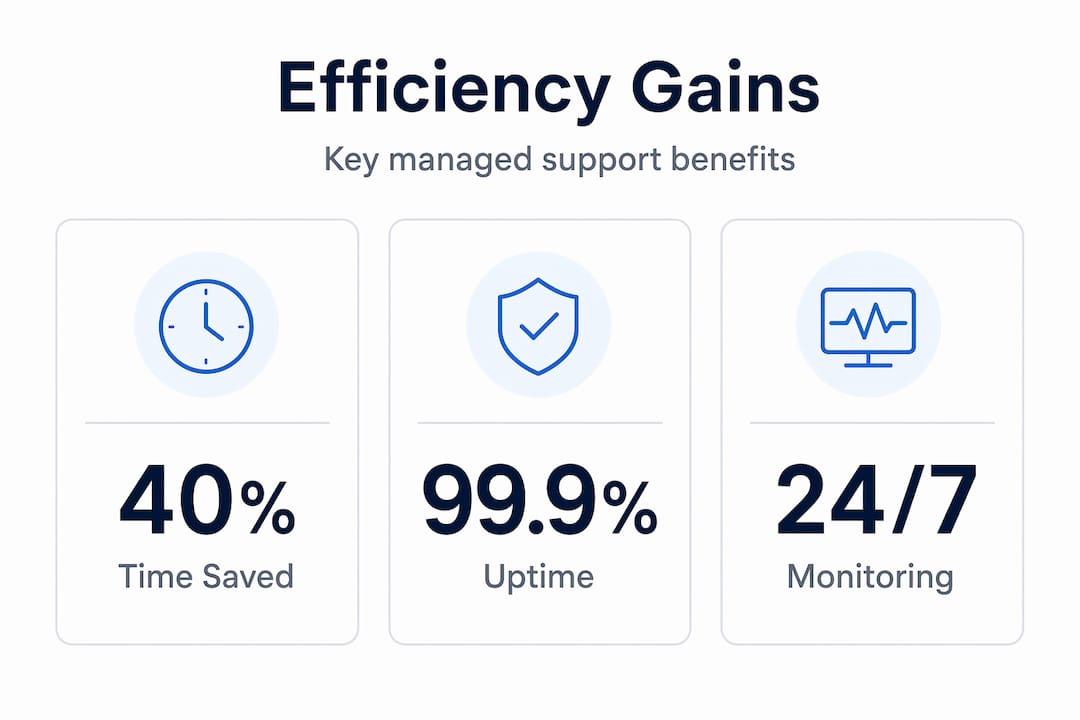
On time, the gains come from automation. Patch management, backup verification, and health checks that previously required manual effort are handled without your team’s involvement. AWS Managed Services demonstrates how automated patch management and backup services reduce human error and support continuous system availability. For an IT team already stretched across projects, that reclaimed time is significant.
On security, the managed model creates a continuous posture rather than periodic attention. Strong managed security practices include continuous updates, audits, and monitoring, which directly reduce exposure to breaches and unplanned downtime. Reactive teams tend to patch after vulnerabilities are publicised. Managed providers apply patches on a schedule tied to risk classification, which closes the window considerably.
On reliability, the numbers tell a clear story. Systems under continuous monitoring experience fewer extended outages because problems are detected at the signal stage, not the failure stage. Consider the difference between a provider who notices a storage capacity trend and alerts you at 70% utilisation versus one who calls you when the system stops accepting writes at 100%.
- Automated monitoring surfaces performance degradation before users report it
- Scheduled maintenance windows prevent surprise failures during business hours
- Documented recovery procedures mean a junior team member can execute a restoration under pressure
- Regular compliance reporting reduces audit preparation time and regulatory exposure
Pro Tip: Ask any managed software support provider to show you a sample monthly report before you sign. If they cannot show you what ongoing visibility looks like, reconsider.
The cost efficiency angle is worth addressing directly. Outsourcing IT functions provides cost predictability and access to specialist expertise that in-house teams struggle to replicate across every technology in your stack. Predictable monthly costs also make budget planning more accurate than the unpredictable expenses of reactive support engagements.
How to choose software support for your organisation
How to choose software support comes down to matching provider capability to your specific operational context, not finding the cheapest option that roughly fits.
Here is a structured approach to evaluating managed software solutions:
-
Audit your current environment. List every system that requires support, its criticality, and its maintenance history. You cannot evaluate a provider’s fit without knowing what you are bringing to them. For complex or custom platforms, review guidance on defining software requirements before engaging providers.
-
Define your SLA requirements. Determine acceptable response times, uptime targets, and escalation thresholds for each system tier. Mission-critical systems may require a one-hour response SLA. Administrative tools may tolerate four hours. Document this before any provider conversation.
-
Assess provider specialisation. A managed IT services provider who excels at off-the-shelf software may be entirely wrong for a bespoke web platform. Ask specifically about experience with your technology stack, not just general IT support.
-
Evaluate reporting and transparency. Monthly reporting, incident post-mortems, and change logs are not nice-to-haves. They are how you hold a provider accountable and how you demonstrate compliance to your leadership or auditors.
-
Understand scalability provisions. MSP contracts support growth through flexible service adjustment without requiring infrastructure expansion or additional hires. Confirm that your agreement can expand as your systems grow, without a full renegotiation.
-
Check communication protocols. Who is your named contact? What is the escalation path during an incident at 2am on a Sunday? Providers who cannot answer this clearly have not thought through their delivery model.
The cost structure question deserves separate attention. Fixed monthly fees provide predictability. Per-incident billing restores the incentive problems of break/fix. Time-and-materials arrangements for scope creep are acceptable when well-defined. The contract structure signals the provider’s operating philosophy as much as their pricing.
Managed software support in practice
Abstract definitions only go so far. Here is what managed software support looks like as a lived operational reality.
| Scenario | Without managed support | With managed support |
|---|---|---|
| Security patch released | Patched manually within weeks, if noticed | Assessed and deployed within defined SLA window |
| Storage approaching capacity | Discovered when system fails | Flagged at threshold, capacity added proactively |
| Compliance audit preparation | Weeks of manual log collation | Reports generated from ongoing documentation |
| Developer leaves organisation | Institutional knowledge lost | Documentation maintained as ongoing deliverable |
Consider a mid-sized financial services firm running a custom client portal. Without managed support, their two-person IT team handles patches reactively and has no formal backup validation process. An audit reveals three months of backup failures that nobody noticed. With a managed support arrangement, automated backup verification runs nightly, discrepancies trigger alerts within hours, and the audit report is generated from a documented log rather than a frantic manual search.
That scenario is not hypothetical. It is the kind of situation that well-maintained web applications are specifically designed to avoid through good architecture and continuous operational oversight.
My honest take on managed software support
I have watched organisations sign managed support contracts and then treat them like a set-and-forget insurance policy. That is the single biggest mistake I see, and it consistently delivers disappointing results.
In my experience, the IT managers who get the most from managed software support are the ones who treat it as a working partnership, not a vendor transaction. They review monthly reports seriously. They push back when SLA metrics slip. They bring their provider into planning conversations about system changes rather than notifying them after the fact.
The second thing I have noticed is that many organisations massively underestimate what the scope of managed software support actually covers. They budget for it as if it replaces a help desk. It does not. It replaces an entire operational discipline, including proactive maintenance, security monitoring, documentation upkeep, and continuity planning. When you understand that, the pricing looks very different.
My view on the current direction of the field is this: automation is absorbing the routine tasks rapidly, and the real value in managed support relationships is increasingly about judgement, not just execution. A provider who can tell you why a pattern in your system metrics matters, and what to do about it before it becomes an incident, is worth considerably more than one who just closes tickets.
Negotiate your SLAs with specificity. Review them quarterly. And choose a provider who will tell you uncomfortable things about your systems, not just report green status.
— Liam
How Pixeldev approaches managed software support
If this article has clarified what managed software support should look like, the next logical question is whether your current arrangement actually delivers it.
Pixeldev builds and maintains custom software platforms for organisations that cannot afford to treat their systems as disposable. The team works across the full lifecycle, from architecture decisions through to ongoing maintenance, hotfixes, and operational oversight. If you are evaluating a managed support arrangement for a bespoke platform or wondering whether your existing setup matches the standard described here, explore Pixeldev’s services or visit the Pixeldev website to understand how a senior, specialist team approaches long-term software reliability.
FAQ
What is managed software support?
Managed software support is a proactive, contractual model where a specialist provider takes ongoing responsibility for software maintenance, monitoring, security, and performance under defined service level agreements. It differs from reactive break/fix support by addressing issues before they cause system failures.
How does managed support differ from basic software support?
Basic software support services are typically reactive and product-specific, responding to incidents after they occur. Managed software support is proactive, covering continuous monitoring, patch management, backups, and compliance reporting across your systems.
What should an SLA for managed software support include?
An SLA should specify response time tiers for different incident priorities, uptime targets, escalation procedures, reporting cadences, and defined consequences when metrics are not met. Clear, measurable SLA metrics are the primary mechanism for supplier accountability.
Can managed software support replace an in-house IT team?
It can supplement or replace specific functions, depending on your organisation’s size and complexity. Managed providers deliver specialist breadth that is difficult to build in-house, particularly across security, compliance, and automation. Many organisations run a hybrid model, with internal staff handling strategy and provider relationships while MSPs handle operational maintenance.
How do I know if I need managed software support?
If your team is patching reactively, lacks documented recovery procedures, or cannot produce a current inventory of system health metrics, you are already experiencing the gaps that managed software support is designed to close. Organisations running custom platforms with compliance obligations are particularly strong candidates.