WorkYawn
A dashboard where AI agents do the client work, and we approve three things per job.
Pixeldev is a small studio with a lot of clients. Requests arrive by email, Messenger, ClickUp and job boards, and every one needs the same loop: read it, find the repo, plan, build, check, ship, reply. Yawn is the product we built to run that loop with AI agents, so that work keeps moving when nobody is at a desk, and nothing reaches a client without a person saying yes.
- Product
- Yawn
- Who it's for
- Us, first. A single-owner studio running many clients
- Services
- Product design, custom software, AI agents, integrations
- Stack
- React, Fastify, PostgreSQL, Claude Agent SDK, Playwright, Docker
- Timeline
- Spec to production in four days, 14 to 17 November 2026
The problem
We had already tried twice. Both earlier attempts proved that an agent could do a lot of a job, and both left real scars: agents sharing one live working tree and shipping each other's half-finished edits, a single-writer database that stalled, no push notifications, and agents so locked down that one small job needed five plan approvals. Neither could tell us, in one place, what was running, what was waiting on us and what it was costing.
The bigger cost was context. When a client replied to a job finished three weeks ago, the history of what was asked and what shipped lived in an inbox, a terminal scrollback and someone's memory. Work stalled whenever we were away from a desk, which for a studio that visits clients is most of the day.
What we built
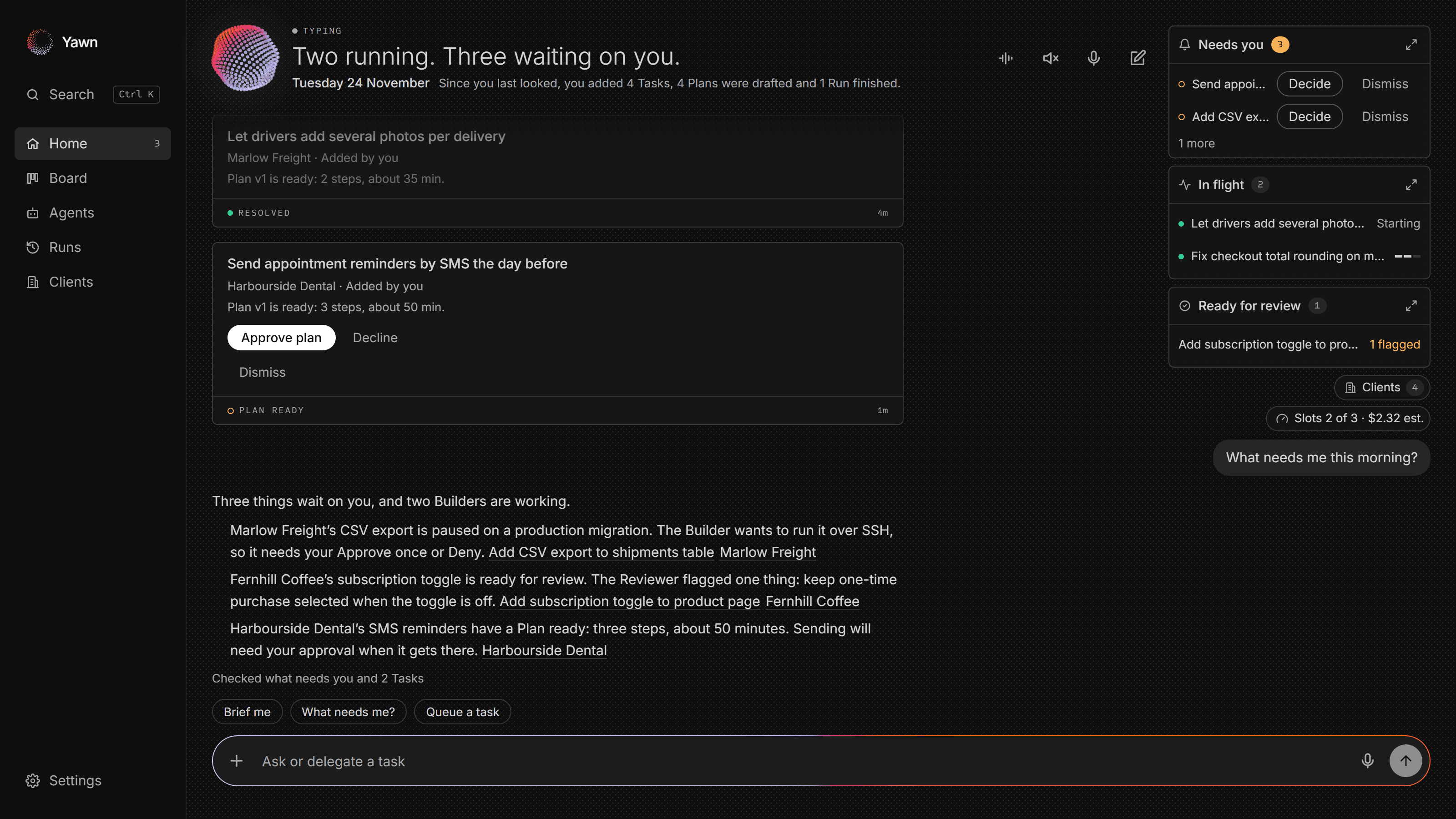
Yawn is a single-owner operations dashboard, installed on a phone as an app and running on one server. Each client has its own context and Connections: git repos, websites with their environments, servers, mailboxes, chat channels, ClickUp, job boards and the logins for their support desks. Inbound messages on those Connections become Tasks, or attach to the Task they belong to.
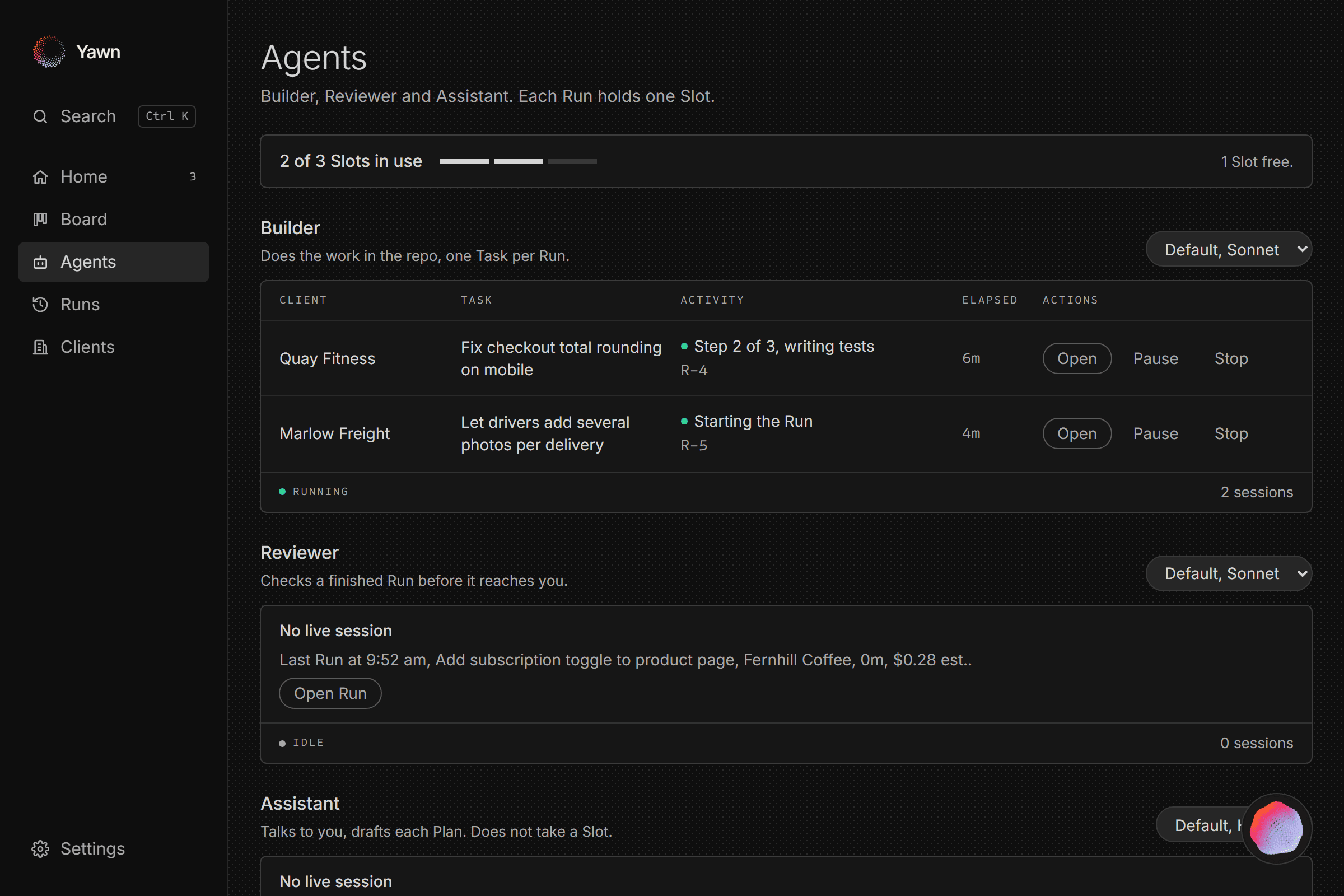
Every Task is worked by real Claude Code sessions with the full toolset and the repo's own skills and rules. The Assistant drafts a Plan. A Builder does the work in its own git worktree and branch, so concurrent jobs never see each other's changes. A separate Reviewer reads the diff against the approved Plan and flags what it finds. Then it comes to us.
- 1Three decisions per Task: approve the Plan, review the work, approve the reply. Each is a card we can answer in one tap from Home, the board or a push notification.
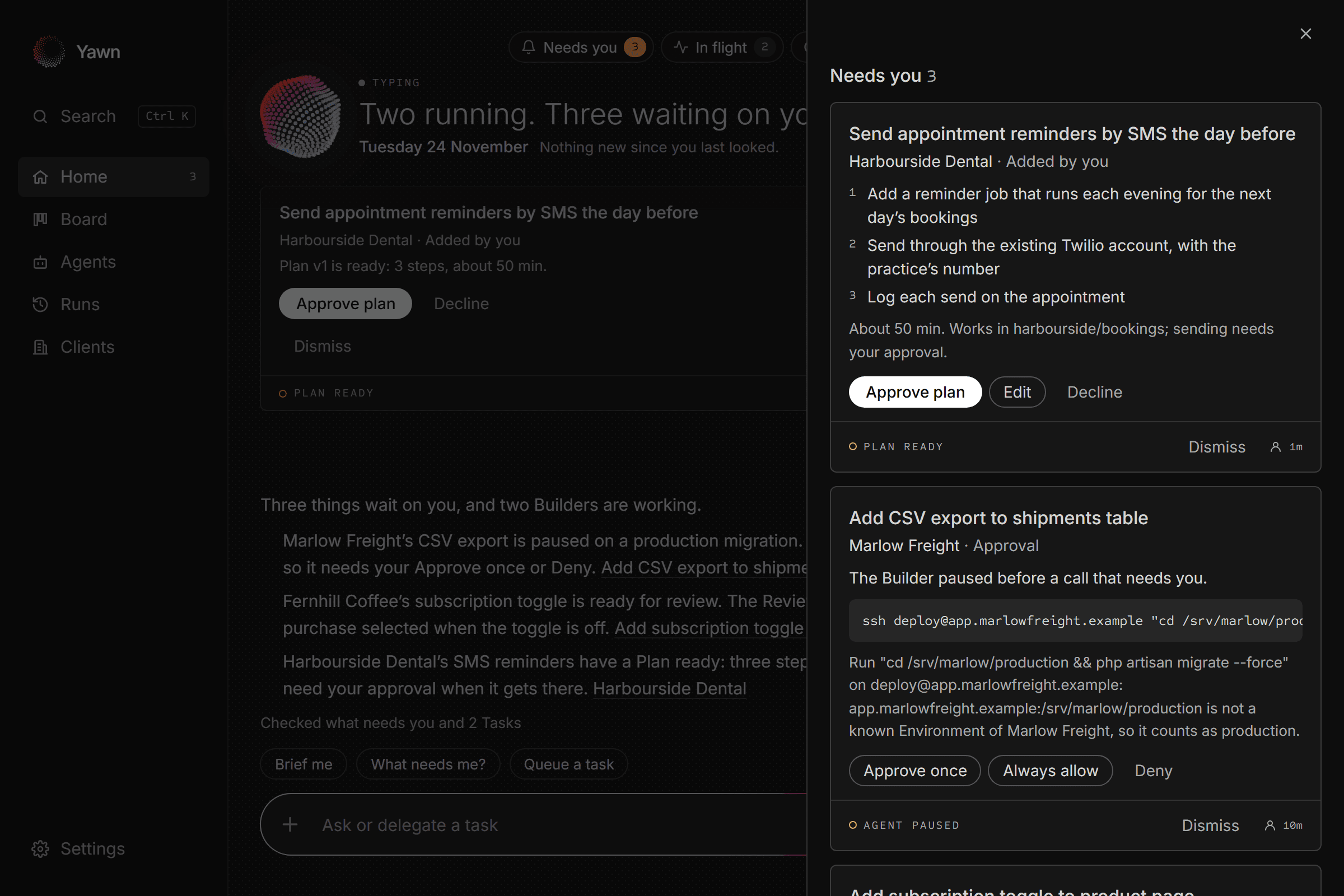
- 2Approvals for anything production-class. A deploy, a migration on a live server or a message to a real person pauses the agent and shows us the exact command and its effect, with Approve once, Always allow and Deny.
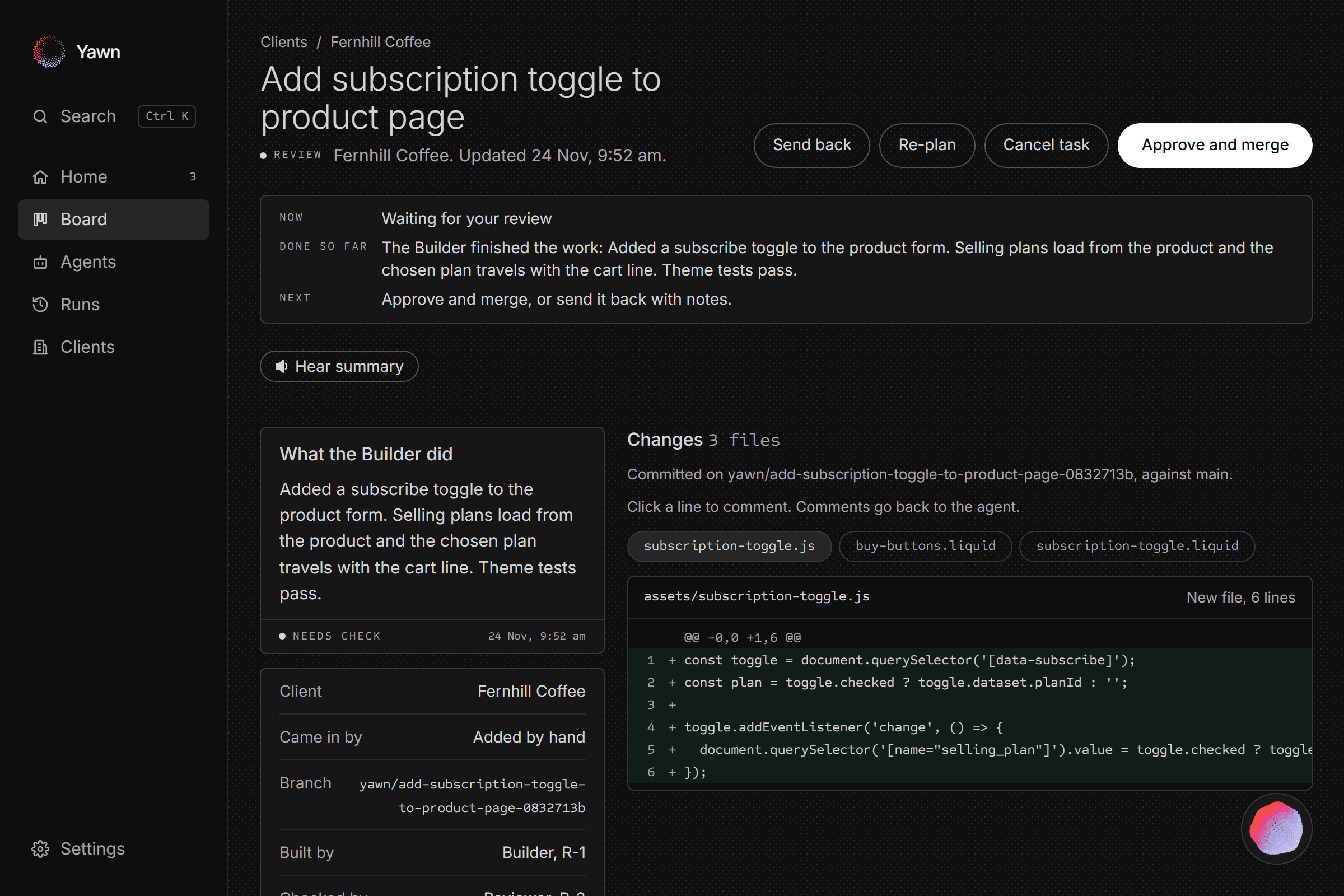
- 3A Review page with what the Builder did, the checks that ran, the Reviewer's findings and the diff file by file. Click a line to comment and send it back.
- 4A master chat that sees every Task and every agent, live and past, and can run any dashboard operation. We can type to it, talk to it, and have it answer aloud.
- 5Intake from Gmail, IMAP mailboxes, Messenger, ClickUp and job boards, routed to the right client by sender and thread, with an Unassigned inbox for anything it can't place.
- 6Self-improvement. Asking Yawn to change itself goes through the same Plan, build, review and merge flow, then it builds its own release, deploys it, health-checks it and rolls back on failure.
The hard part
Giving agents real power without giving them the keys. An agent working for one client must never be able to touch another client's systems, so each client's sessions run as their own OS user on the server, reach only that client's Connections, and never see a password: website logins are typed by Yawn's own browser, and a Keap or Google token is used by the API on the agent's behalf. Production-class actions are caught by a policy hook before they run, not described in a prompt and hoped for.
The other hard part was keeping work alive. Sessions are owned by a separate long-lived host process, so the API can be redeployed, including by Yawn itself, without ending a Run. If that host crashes, it reconciles what it finds on boot rather than blindly re-running: a turn that ended inside a non-read-only call becomes a failed Run that names the call, and waits for us.
It is also the first thing we have built that improves itself in production. Of its 813 commits, 52 were made by Yawn: a Builder working in a worktree of its own repo, its own test suite run before Review, a release built and deployed by its own deployer with automatic rollback. The memory limits in the deployment notes exist because two of those early self-changes swapped the server to a halt, and the fix was shipped the same way.
How it went
The spec, 123 user stories and a 37-screen design canvas, was written on 14 November 2026. Four days and 113 tickets later it was running our client work in production on Dokploy, with passkey sign-in, push notifications and voice. It has been taking in client email, ClickUp tasks and Messenger chats since, and we now spend our mornings approving plans and reading diffs instead of reading inboxes.
What it changed for us is the shape of a working day. A client's request arrives at 6am, a Plan is waiting by the time we look at a phone, and the work is in Review by the time we are at a desk. The history of every job lives on its Task, so when a client writes back a month later the agent starts with everything that was decided the first time. We're still adding to it, and increasingly it adds to itself.
More work
All case studiesOps dashboard, WooCommerce, Keap and Meta
TakeShape Adventures operations dashboard
A staff operations dashboard for an adventure travel company: every departure's manifest and check-in, trip pages edited and published back to WordPress, and the Keap and Meta automations that used to live in third-party glue, all running off one Postgres database.
Plugin, WooCommerce and Square
Square Sync for Woo
Our WordPress plugin that keeps products, stock, orders and customers in step between WooCommerce and Square, both directions. It comes with its own webhook relay and licensing platform, and has shipped 416 releases.
- TakeShape Adventures
- Bowery
- Test Drive
- TakeShape Adventures
- Bowery
- Test Drive
- TakeShape Adventures
- Bowery
- Test Drive