Work/TakeShape Adventures operations dashboard
One place to run the trips, with WordPress, Keap and Meta kept in step behind it.
TakeShape Adventures sells guided hikes and multi-day trips through a WordPress and WooCommerce site, keeps its contacts in Keap and finds new customers through Meta ads. I built the staff dashboard that sits across all of it: departures and check-in, trip content, orders, and the automations between Keap and Meta.
- Client
- TakeShape Adventures
- Industry
- Adventure travel
- Services
- Custom software, integrations, WordPress plugin development
- Stack
- Next.js 16, tRPC, Prisma, PostgreSQL, BullMQ, Coolify
- Timeline
- First version Aug 2025, rebuilt Jul to Sep 2026
The problem
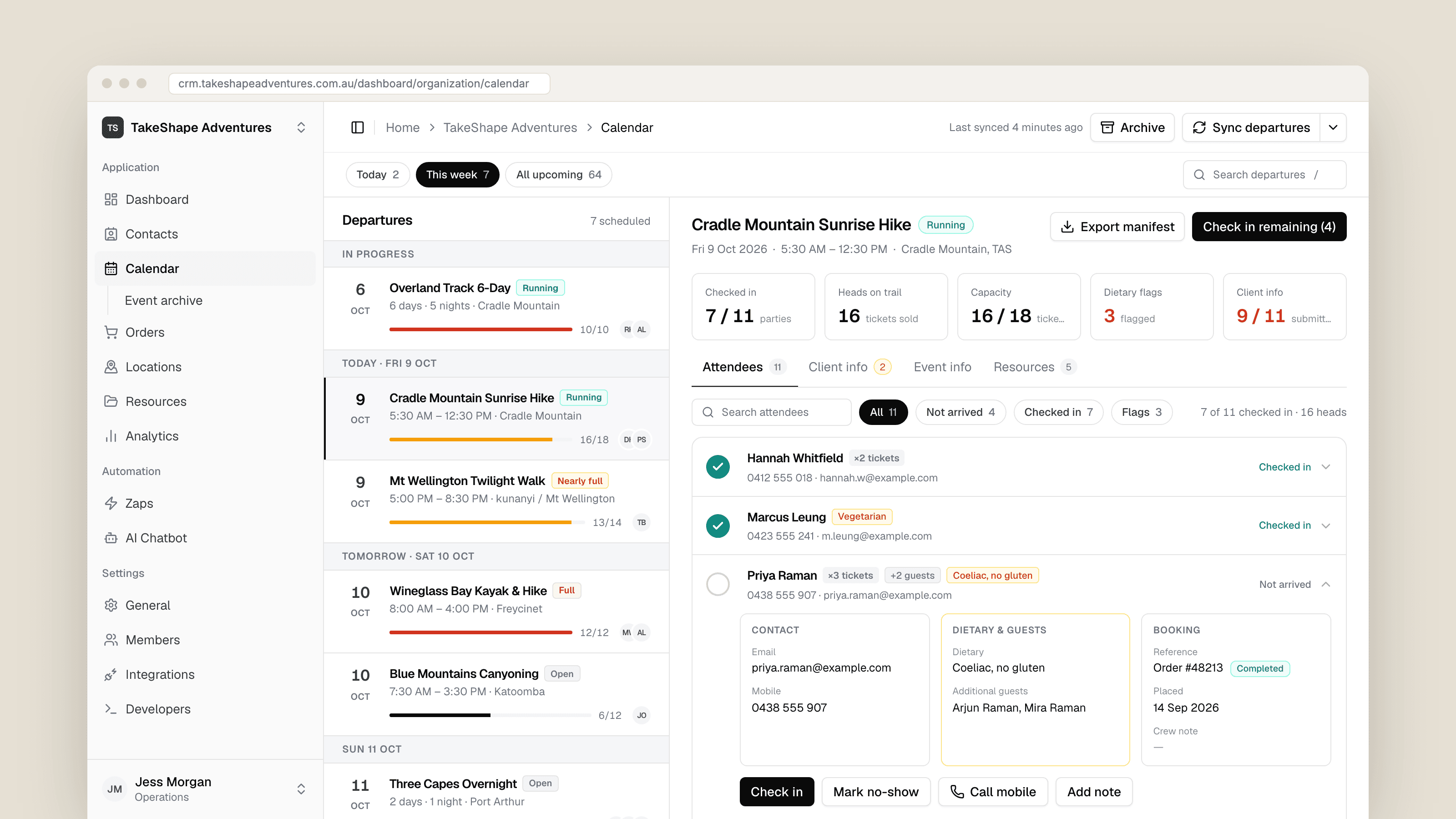
The bookings happen in WooCommerce, the contacts live in Keap, the leads arrive from Meta ads, and the trip pages are WordPress taxonomy terms with a lot of custom fields. Each of those tools did its own job. None of them could tell a guide at 5:30 in the morning who was booked on today's walk, who had a dietary flag, and who had already arrived.
As their operations manager put it, running a departure used to mean printing the list from WP admin the night before, then ringing around to find out who had dietary needs or had changed their booking. The glue between Keap tags and Meta audiences, and between Meta lead forms and Keap contacts, also needed somewhere it could be watched and fixed when it failed.
What I built
A Next.js dashboard backed by Postgres that mirrors what it needs from each system and writes back where staff need to edit. A small WordPress plugin I wrote serves the endpoints it reads and writes, and pings the dashboard when an order or a trip changes, so a booking shows up in seconds rather than on the next scheduled pass.
- 1Departures and check-in: every upcoming trip with capacity, crew and a manifest per booking party. One tap checks a party in, with crew notes, no-shows and a CSV export for the day.
- 2Locations: the trip pages edited in the dashboard, including highlights, itinerary, packing lists, gallery images and a publish checklist, then published back to the WordPress term.
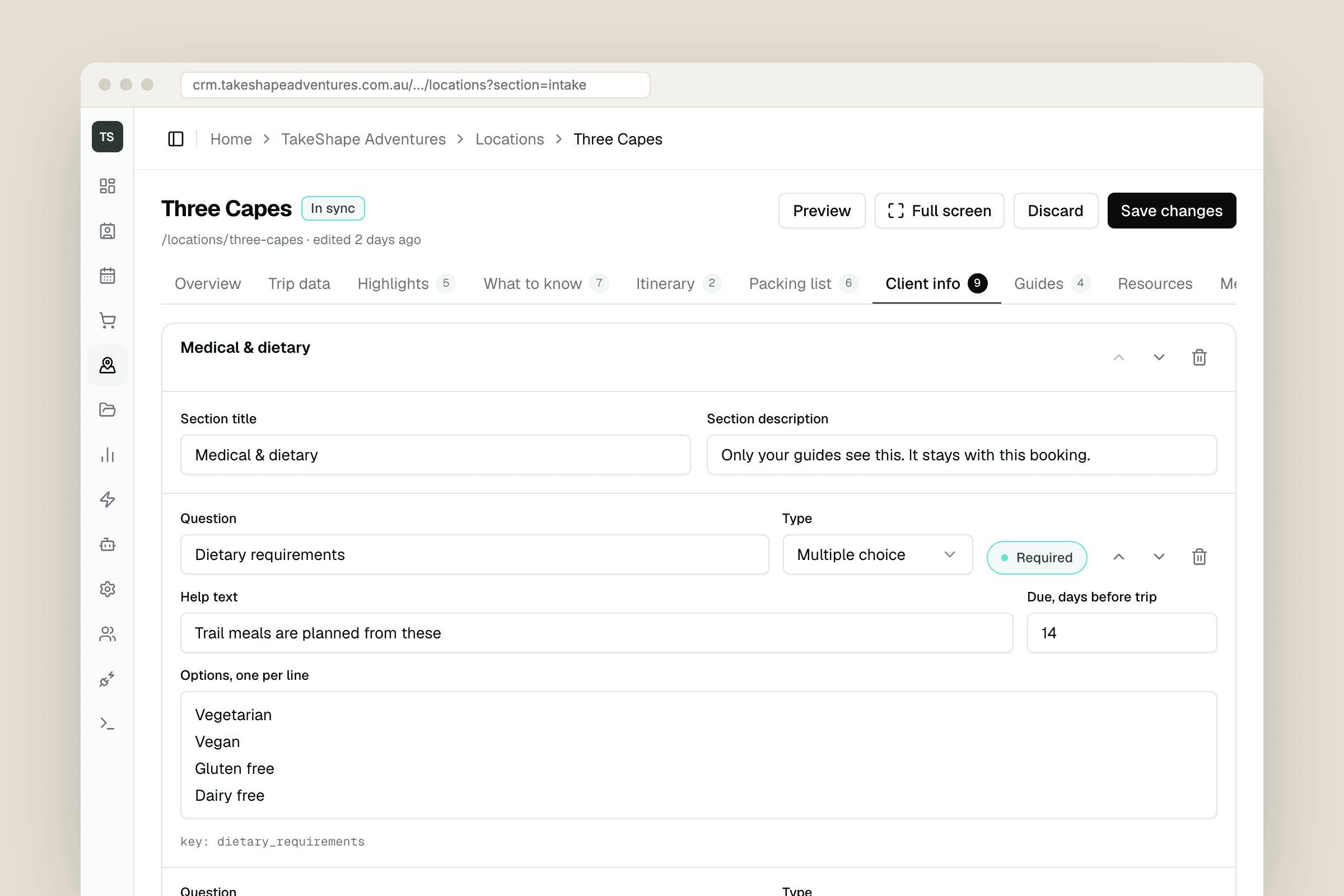
- 3Client info forms: each location defines the questions guests answer in the member app after booking, with presets, required fields and due dates counted back from departure.
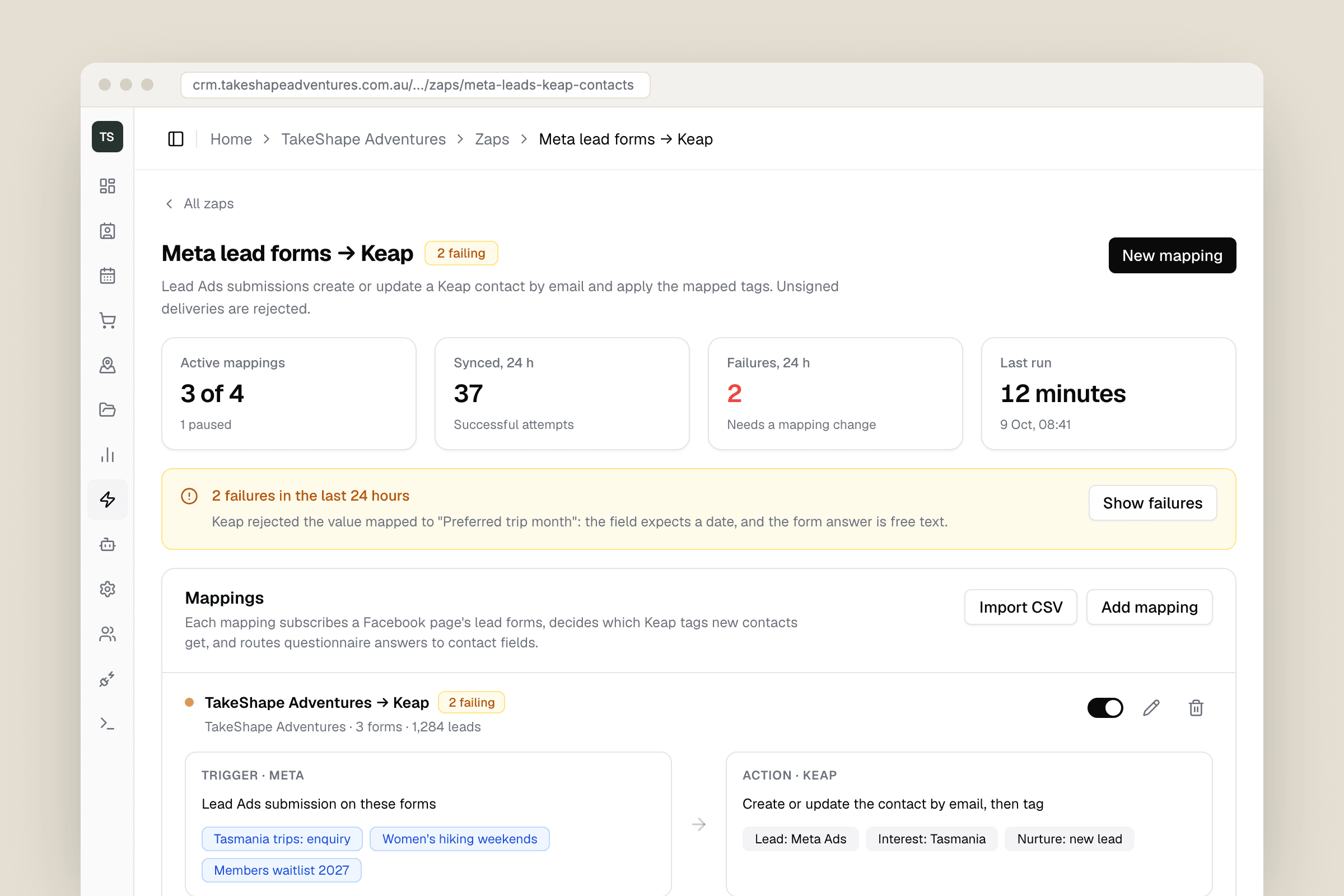
- 4Zaps: Keap tags kept in step with Meta custom audiences, and Meta lead form submissions turned into tagged Keap contacts, with every attempt logged and failures surfaced with their reason.
- 5Orders, contacts, a resource library aimed at locations, trip types or states, and a BullMQ worker that runs the scheduled syncs.
The hard part
Syncing four systems that each think they are the source of truth. WooCommerce deletes and recreates order line items on every update, so check-ins are keyed on a stable order and item pair rather than the row, and a re-sync never loses who arrived. Syncs can be triggered by a button, the schedule and the WordPress ping at once, so every one takes a Postgres advisory lock per organisation and kind, and a collision is skipped rather than allowed to fight over the same rows.
The edges are where the trust is. Meta lead webhooks must be signed or they are rejected, Keap deliveries are authenticated by a secret in the callback URL because Keap does not sign them, and OAuth callbacks re-derive the organisation from the session so a forged state cannot attach tokens to the wrong account. Client info answers arrive from the member app encrypted with AES-256-GCM and stay encrypted at rest; they are decrypted only inside the request that shows them to a staff member. When stock is not managed in WooCommerce, capacity is shown as unknown rather than guessed.
How it went
The first version went in during August 2025 on a starter kit that read the WordPress database directly. In July 2026 I rebuilt it on a stronger base, moved WordPress access behind a REST plugin, and took the chance to fix what the first version got wrong: a PHP serialisation parser that broke on quotes, tags that could leak between organisations, and a capacity number that was invented. Once check-in moved into the dashboard, the team stopped printing manifests and stopped ringing guests the night before to confirm details, and guides now start the day from their phones. It runs in production on Coolify, and I'm still adding to it.
More work
All case studiesInternal tool, private credit funds
Investor onboarding for Bowery
An internal onboarding workspace for a private credit fund manager. Staff upload a signed application, check what the app read off it, work Bowery's 26-item AML/KYC checklist, and the result is filed into their Microsoft 365 investor register.
Dealership platform, licence scanning, e-signing
KIR
A mobile-first platform for a prestige used-car dealership to run test drives and loan cars: stock imported from their website, licences read by the phone camera, agreements signed on the spot or by text link, and a live view of every car that is out.