Work/Investor onboarding for Bowery
A staged onboarding workspace that reads the application form, runs the compliance checklist and files the result into the client's own Microsoft 365 register.
Bowery runs two private credit funds and onboards wholesale investors by hand: a paper checklist, a shared Excel register and a SharePoint folder per investor. I built them an internal tool that takes a signed application from upload to sign-off, without moving their records out of Microsoft 365. Their staff still make every decision. The app does the reading, filing and bookkeeping around those decisions.
- Client
- Bowery
- Industry
- Private credit funds management
- Services
- Workflow design, full-stack build, Microsoft 365 and HubSpot integration
- Stack
- Next.js 16, tRPC, Prisma and Postgres, Microsoft Graph, Python extraction worker
- Timeline
- June to October 2026, 130 commits
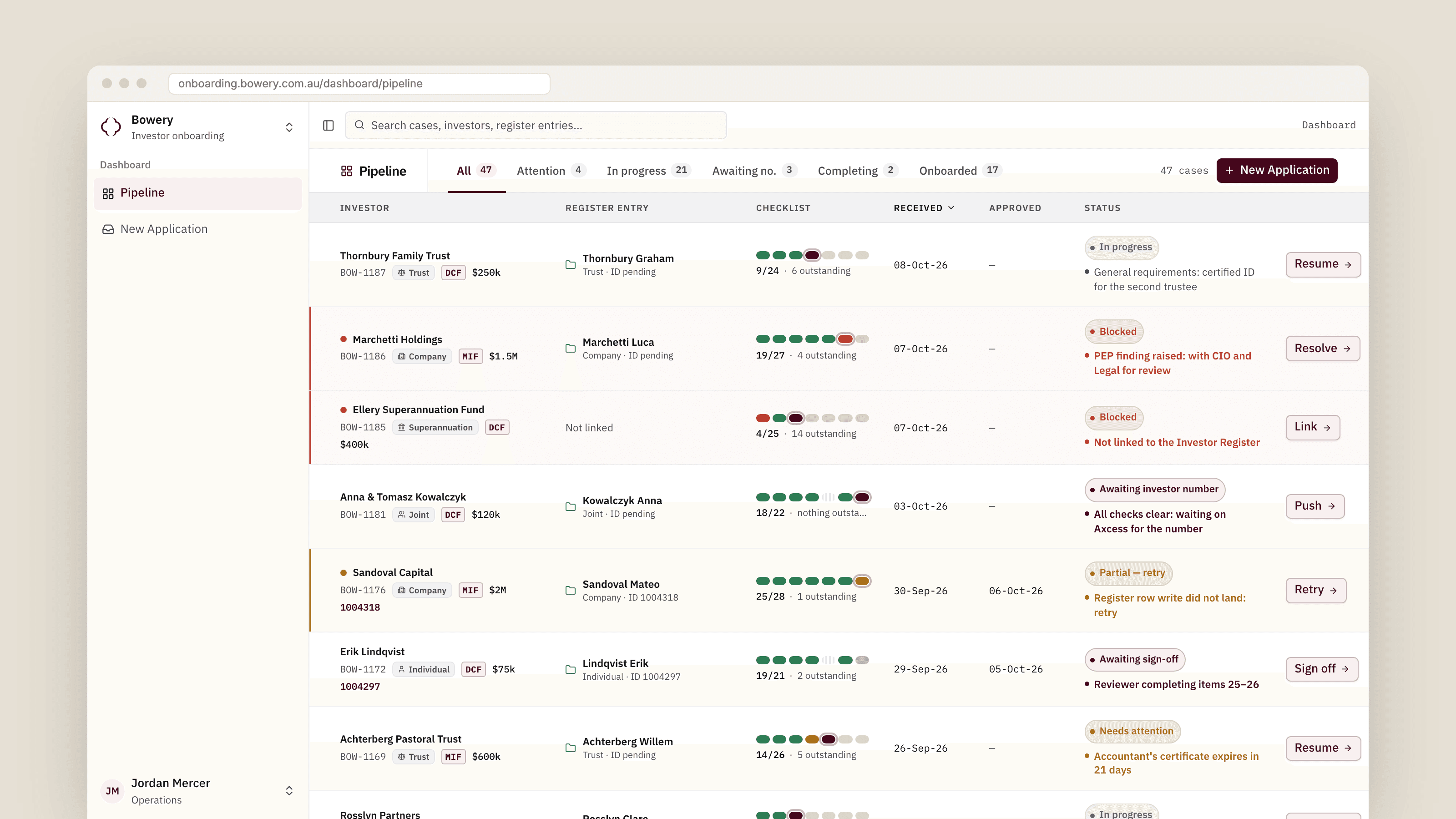
The problem
Bowery onboards investors into two funds with different rules: the Diversified Credit Fund and the Mortgage & Investment Fund. Each application arrives as a signed PDF, sometimes filled in on screen, sometimes printed, handwritten and scanned. Staff retyped it into an Excel Master Workbook, filed the paperwork into a SharePoint folder per investor and ticked through a 26-item paper checklist that changes with the investor type: an individual needs different checks from a trust with a corporate trustee.
The register is the firm's record of truth, so whatever I built could not replace it. It had to fit around it, and leave every compliance decision with a person. As their operations manager put it, every new investor meant an afternoon of retyping, and nobody could say for sure which checks had been done.
What I built
A single-tenant Next.js app behind Microsoft sign-in, locked to Bowery's own tenant. A case moves through seven stages: register link, application, verify, general requirements, entity and structure, AML/KYC, then review and completion. The checklist is Bowery's paper one turned into config, so each investor type only sees the items that apply to it, and the rest are folded away as not applicable rather than hidden.
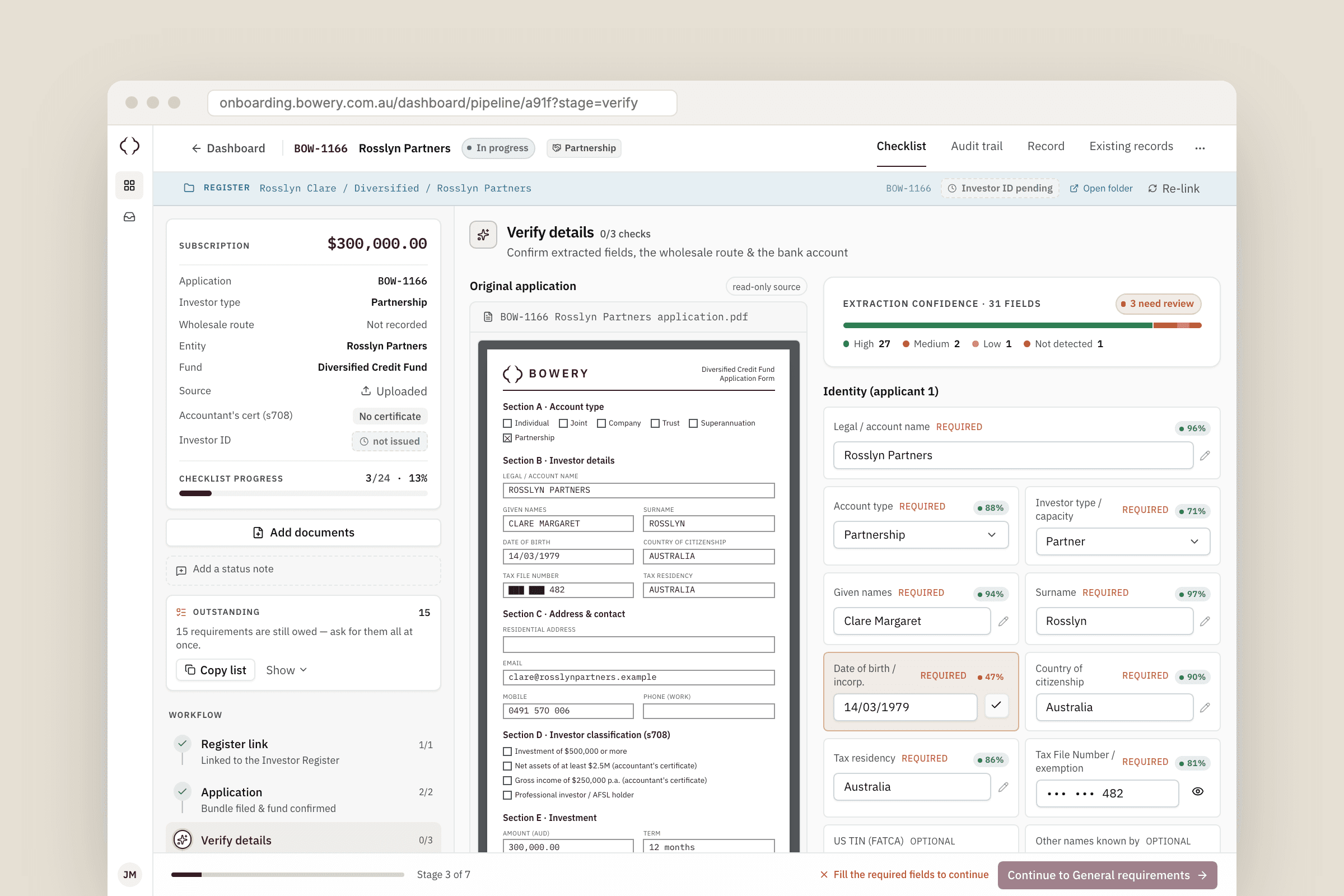
On Verify, the original PDF sits beside every field the app read from it. Each field carries a confidence score from 0 to 100, anything under 60 is flagged, and nothing goes forward until a person has confirmed or corrected it. Once Verify is confirmed, checklist items the confirmed data already satisfies are pre-ticked with their source shown, and staff can untick any of them.
- 1Upload the signed application. It lands in a staging folder in Bowery's SharePoint, never on my servers.
- 2Link the case to a person in the register. The app suggests matches, but a human always makes the choice.
- 3Confirm the extracted fields against the PDF, then work through the checklist.
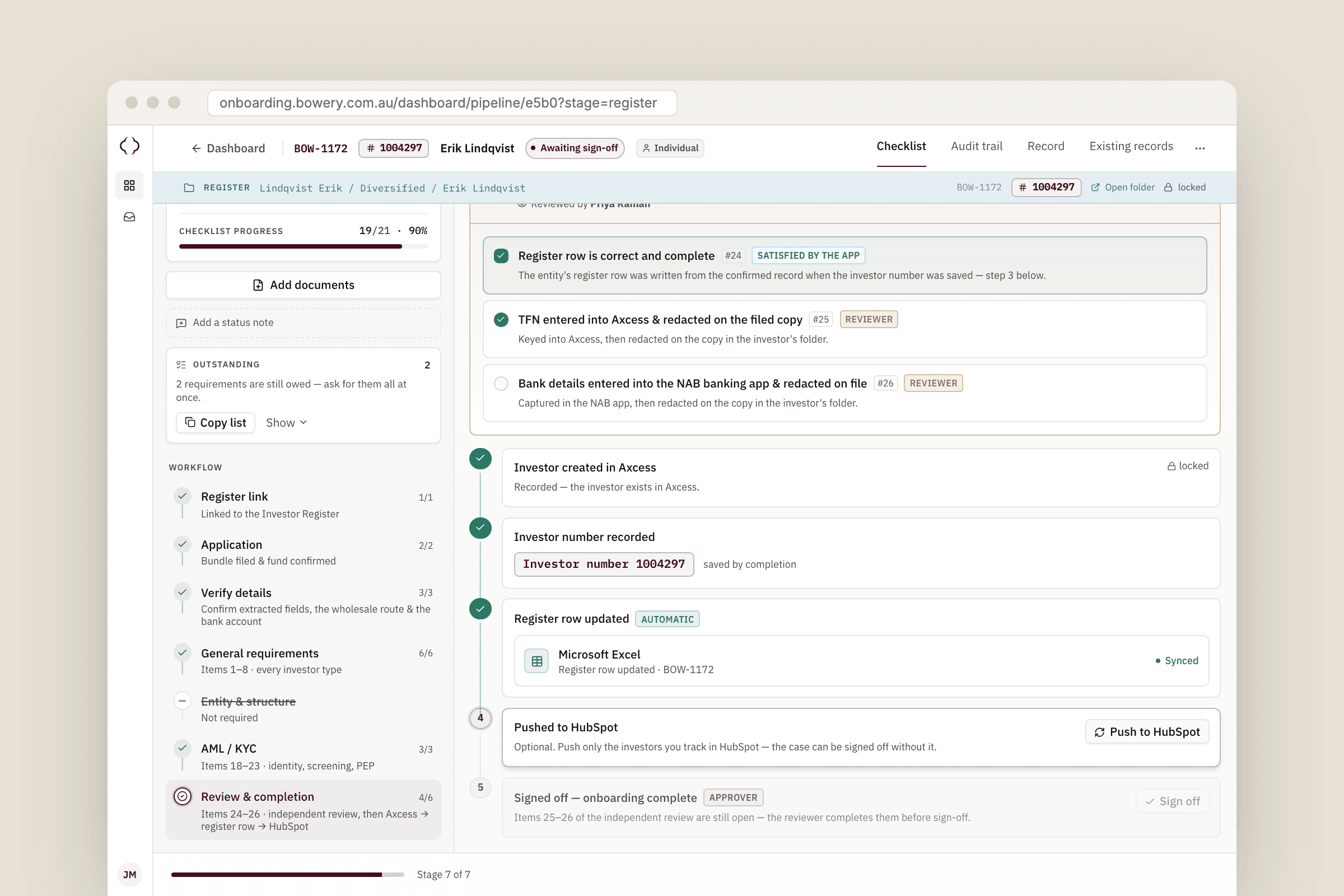
- 4Key in the investor number from Axcess. That writes the register row, and the HubSpot push is a separate, optional step.
- 5An independent reviewer clears the last items and signs off. Only then does the case lock.
The hard part
Reading the forms reliably. Extraction runs in a Python worker built on pymupdf4llm, started fresh for each job in a Docker container with no network and a read-only filesystem, so an untrusted PDF never gets near anything that matters. The worker reads live form widgets, typed text, OCR of scanned pages and the ink inside tick boxes, and scores each field from the evidence it actually found. Those scores are tested against 31 sample forms: fillable, flattened, poorly scanned and rotated.
Writing to a spreadsheet that people also edit by hand. The Master Workbook stays the source of truth, so every write goes through Microsoft Graph. Columns are looked up by their header on every call, and a renamed or duplicated column stops the write and reports it, rather than writing into the wrong cell. Rows are keyed by a Case Reference column the app adds. Writes are serialised with a Postgres advisory lock. Folder creation is idempotent, and before creating a person's folder the app looks for an existing one, matching the naming conventions staff had used across 695 existing folders.
Completion is one ordered action. Saving the investor number writes the register row first. A failure leaves the case visibly partial with a retry button, and nothing reaches HubSpot until the register has the row. Personal details are encrypted per record with AES-256-GCM, files are streamed from SharePoint on the viewer's own token, and the audit trail is append-only and never records personal details.
How it went
I built it over 130 commits between June and October 2026, working from Bowery's own checklist and register rather than a generic CRM template. Every external system has an in-memory fake behind a flag, so the whole flow runs locally with no Microsoft tenant. That is also how the 674 app tests cover the completion sequencing without Postgres or Graph.
Since it went into daily use, a typical case moves from received application to sign-off in two to three days instead of around two weeks, and nobody retypes an application into the register any more. The review screen was the part the team warmed to first: in their words, they can finally see what was checked, by whom and against what, and the register still looks exactly like theirs.
More work
All case studiesDealership platform, licence scanning, e-signing
KIR
A mobile-first platform for a prestige used-car dealership to run test drives and loan cars: stock imported from their website, licences read by the phone camera, agreements signed on the spot or by text link, and a live view of every car that is out.
Ops dashboard, WooCommerce, Keap and Meta
TakeShape Adventures operations dashboard
A staff operations dashboard for an adventure travel company: every departure's manifest and check-in, trip pages edited and published back to WordPress, and the Keap and Meta automations that used to live in third-party glue, all running off one Postgres database.